
Index Maintenance: REINDEX, Index Bloat, and When to Rebuild
PostgreSQL indexes are incredibly fast — until they aren’t. Over time, as tables churn with updates and deletes, indexes slowly accumulate empty space and become less efficient. This is known as index bloat, and it’s one of the biggest silent performance killers in real-world databases.
In this guide, we’ll break down what index bloat is, how to measure it, and when it's time to rebuild an index using REINDEX or REINDEX CONCURRENTLY. We'll also use the Pagila Sample Database for examples.
How to Measure Index Bloat
The easiest way to inspect bloat in PostgreSQL is with the pgstattuple extension. It works on both tables and indexes, but the results look slightly different depending on what you run it against. Let’s walk through both cases so you know exactly what to look for.
CREATE EXTENSION IF NOT EXISTS pgstattuple;
First, inspect an index — for example, Pagila’s rental_pkey:
SELECT *
FROM pgstattuple('public.rental_pkey');
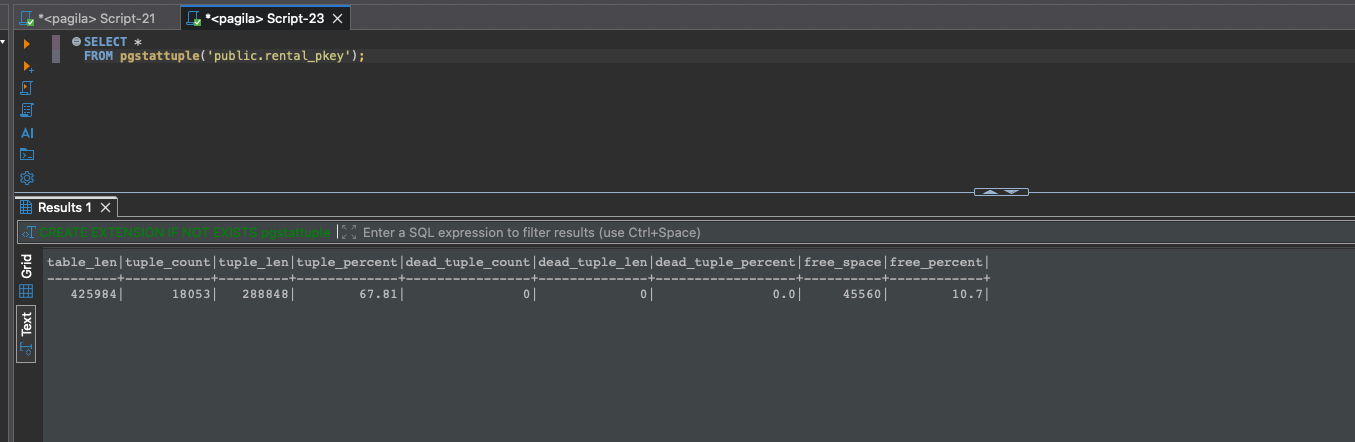
When you run pgstattuple on an index, the most important fields are dead_tuple_percent and free_percent. PostgreSQL does not shrink index pages automatically, so empty space inside the index (free_percent) plus any dead entries (dead_tuple_percent) tells you how much of the index has effectively gone stale.
For example, if an index shows 10% free space and 0% dead tuples, it has roughly 10% bloat. If it shows 35% free space and 5% dead tuples, that’s about 40% bloat, which is where performance impact starts to become noticeable.
General rule of thumb:
- Under 20% — Normal
- 20–40% — Worth watching
- Over 40% — Time to rebuild
If you run pgstattuple on a table instead of an index, the output looks a bit different. In that case, dead_tuple_percent represents old row versions left behind by updates and deletes, and free_percent shows unused space inside heap pages. Tables with frequent writes accumulate dead tuples until autovacuum removes them.
SELECT *
FROM pgstattuple('public.film');
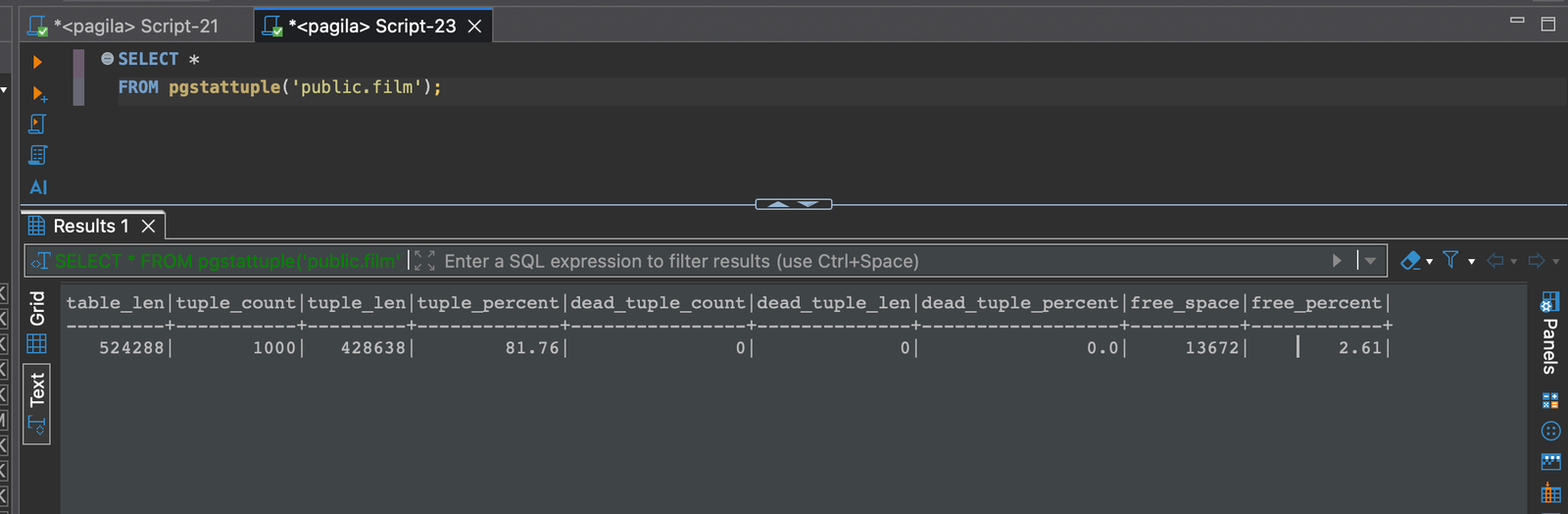
Pagila’s film table rarely changes, so pgstattuple reports 0% dead tuples and only a small amount of free space. That’s exactly what a healthy, low-churn table looks like. Busy OLTP tables, on the other hand, often show much higher percentages as rows are updated and deleted throughout the day.
Indexes on high-churn tables like Pagila’s payment partitions can accumulate significant free space over time, making them perfect examples for learning how index bloat builds up and when a REINDEX becomes necessary.
REINDEX — The Classic Rebuild
REINDEX recreates an index from scratch. It’s the PostgreSQL equivalent of taking everything out of the closet and reorganizing it properly.
REINDEX INDEX rental_pkey;
This creates a brand new index using only live tuples, eliminating fragmentation and empty space.
Important: classic REINDEX is blocking. It locks the underlying table in a way that pauses reads and writes. That’s fine for off-hours maintenance — not great on a live production system.
REINDEX CONCURRENTLY — The Zero-Downtime Option
PostgreSQL 12 introduced REINDEX CONCURRENTLY, which allows you to rebuild an index without blocking normal operations.
REINDEX (CONCURRENTLY) INDEX rental_pkey;
It works by:
- Creating a new index in the background
- Backfilling it with existing rows
- Swapping it in when complete
It’s slower and requires extra disk space temporarily, but it’s far safer for production workloads.
When Should You Rebuild an Index?
You don’t want to rebuild indexes on a fixed schedule. Some databases stay healthy for years, others accumulate bloat in weeks. Instead, rebuild an index when:
- Bloat exceeds 40%
- The table is extremely update/delete-heavy
- Queries become slower without changing execution plans
- Index scans read far more pages than expected
- pgstattuple shows large amounts of free space
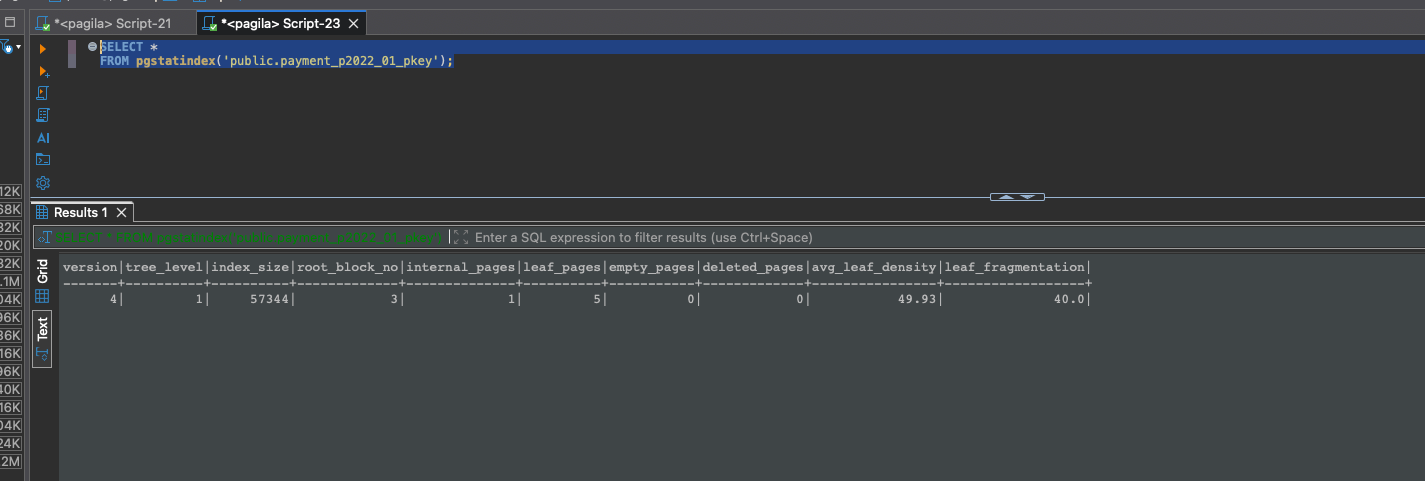
In Pagila, the payment_pkey and idx_payment_customer_id indexes often show early signs of bloat because of constant writes. You can see from my screenshot that the primary key index has 50% bloat and high fragementation at 40% — time for a rebuild!
SELECT * FROM pgstatindex('public.payment_p2022_01_pkey');
Can You Prevent Index Bloat?
You can reduce it — but you can’t fully prevent it. Database workloads simply evolve over time.
- Tune autovacuum for more aggressive cleanup
- Avoid unnecessary updates (even updating a column to the same value bloats indexes)
- Batch large deletes into smaller chunks
- Use partitioning for highly volatile tables
- Choose the right index type (btree vs GIN vs GiST)
Even perfectly tuned systems will eventually need an index rebuild — and that’s normal.
Find Your Most Bloated Indexes
If you want a quick snapshot of index health on a specific table, here’s a handy query that analyzes only btree indexes (the only type supported by pgstatindex). In this example, we inspect all btree indexes on Pagila’s rental table. You can see from my screenshot that the indexes are all fairly healthy with only minor bloat at 11–12%.
SELECT
    c.relname AS index_name,
    pg_size_pretty(pg_relation_size(c.oid)) AS index_size,
    s.avg_leaf_density,
    ROUND((1 - s.avg_leaf_density/100)::numeric, 3) AS estimated_bloat
FROM pg_class c
JOIN pg_index i ON i.indexrelid = c.oid
JOIN pg_class t ON t.oid = i.indrelid
JOIN pg_am am ON am.oid = c.relam
CROSS JOIN LATERAL pgstatindex(c.oid) AS s
WHERE c.relkind = 'i'
  AND t.relname = 'rental'
  AND am.amname = 'btree'
ORDER BY estimated_bloat DESC;
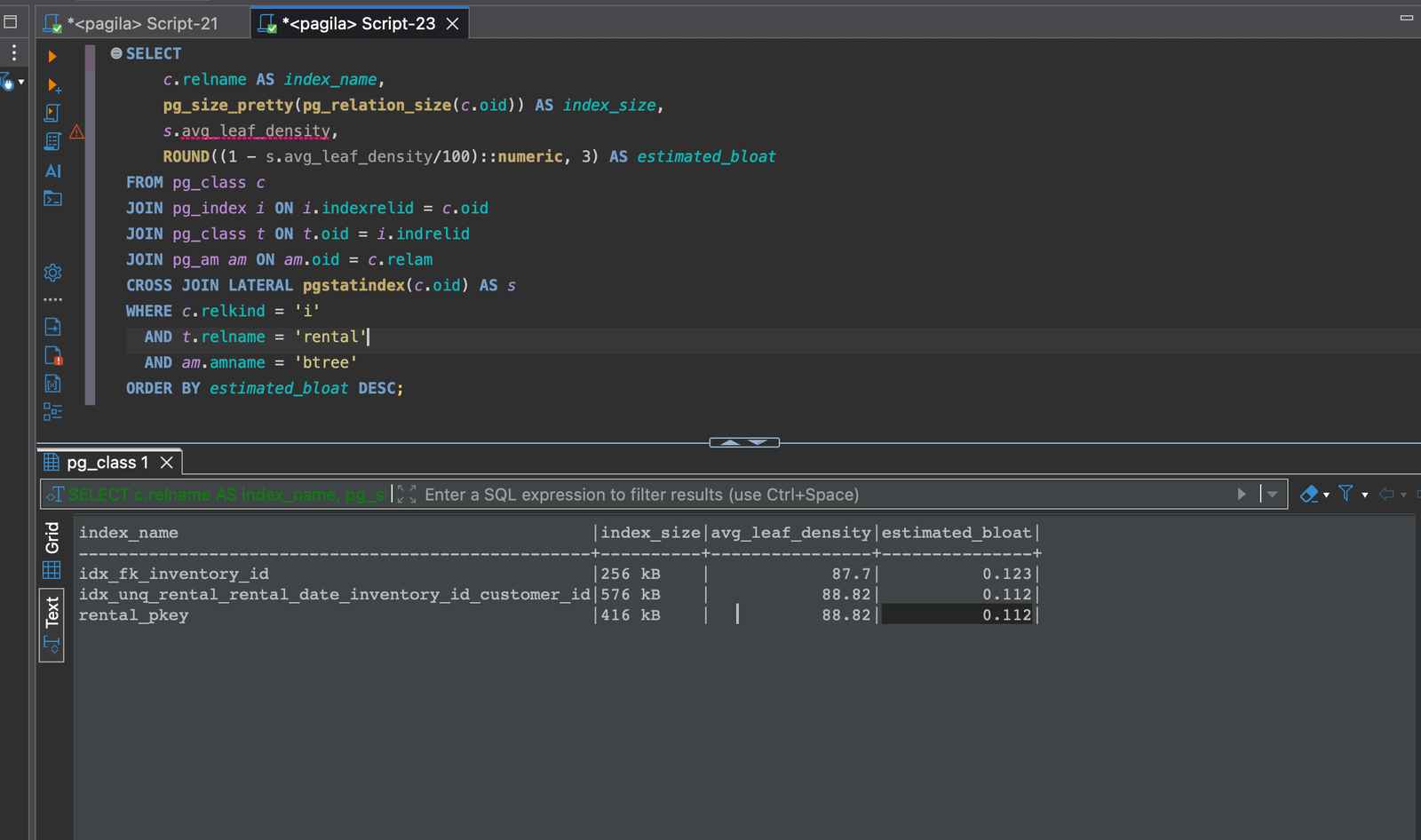
You can adapt this approach to loop over every index in your schema and build an automated weekly bloat report — a very DBA-friendly habit.
Conclusion
Index bloat is an inevitable part of running PostgreSQL in the real world. The key is knowing when it's a harmless mess — and when it's slowing down your entire application.
Use tools like pgstattuple to measure bloat, rebuild with REINDEX CONCURRENTLY when needed, and keep an eye on your most frequently updated tables. A little index hygiene goes a long way toward maintaining consistent performance!





